

Why Brand Safety Gets Harder When AI Enters Production
Generative AI can produce 500 product images in the time it used to take a studio to shoot 30. That speed is real. The problem is that most off-the-shelf AI tools were not built with your brand guidelines in mind, and at 500 images per run, a single prompt deviation compounds into a catalog-wide consistency failure before anyone on the creative team notices.
The Scale Problem Generic AI Tools Create
Off-the-shelf tools like Midjourney or base Stable Diffusion workflows have no concept of your brand. They have no knowledge of your approved model roster, your lighting signature, your color grading LUTs, or the specific way your creative director wants shadow to fall on knitwear. Every generation is statistically unpredictable at a granular level. Run 5,000 SKUs through an unmanaged pipeline and you will get: inconsistent skin tones across colorways, background color drift between product categories, and virtual model proportions that shift between sessions. None of these errors are catastrophic in isolation. At catalog scale, they are a brand safety incident.
Most creative teams underestimate how quickly small visual deviations accumulate. A 2% error rate across 10,000 images means 200 assets that are off-brand, potentially already uploaded to a PDP page before anyone runs a QC loop.
Why Fashion and Ecommerce Brands Are Most Exposed
Fashion operates on visual equity. A luxury brand's product image is not just a product representation; it is a brand promise delivered in pixels. AI tools that perform adequately for generic ecommerce content (white-background electronics, flat-lay accessories) tend to break down in fashion-specific contexts: draped fabrics, sheer overlays, complex prints, and multi-layer garment construction.
Generative AI for jewelry is still unreliable. Metal reflections and fine chain links break almost every model currently available, including Flux Pro and Imagen 3. The refractive quality of polished gold or the micro-detail of a pavé setting consistently produces artifacts that require manual correction in Photoshop. Fashion brands with accessories lines need to account for this gap in their production SLAs before committing to a fully generative workflow.
What Brand Safety Actually Means in AI-Generated Visuals
Beyond Ads: Brand Safety in Creative Output
Brand safety in advertising traditionally means keeping your media placements away from harmful content. That definition is too narrow for creative production teams. When your brand starts using AI to generate product imagery, brand safety expands to cover the output itself: does this image represent the brand accurately, legally, and consistently?
Three questions every creative director should be asking about AI-generated visuals before they go live: Does the model used in this image match our approved casting brief? Does the background, lighting, and color grade match our current season's visual language? Is the garment rendered with enough fidelity that a customer cannot spot a fit or texture error on a high-resolution display?
If the answer to any of these is uncertain, the image is a brand safety risk. Not a legal one, necessarily, but a visual one that compounds across a catalog.
Visual Consistency as a Brand Safety Signal
Customers do not consciously audit product imagery. But they notice when something feels off. Inconsistency in virtual model skin tone between a brand's shirt and trouser category, or a lighting shift between its woven and jersey product lines, creates a subtle but real erosion of trust. Return rates in fashion ecommerce are already between 20% and 40% for apparel. Misleading or inconsistent AI-generated imagery adds to that number without a clear audit trail.
Visual consistency is not a creative preference. It is a measurable brand safety metric. Brands running high-volume AI workflows should be tracking a visual consistency score across their catalog, defined as the percentage of published assets that pass a brand style checklist without manual intervention.
How Generative AI Introduces New Brand Safety Risks
Off-Brand Outputs at Scale
The core risk of generative AI in ecommerce production is not a single bad image. It is the velocity at which off-brand images are created. A batch job running Flux Pro against a generic prompt set can produce 1,000 images in under an hour. Without a QC gate designed specifically for brand compliance (not just technical quality), those images can move through file naming conventions, DAM ingestion, and PDP upload workflows before a human reviews them.
The fix is structural: brand safety in AI production must be enforced at the prompt level, the generation level, and the output review level. Any pipeline that only audits at the end is already too slow.
Model and Likeness Inconsistency Across SKUs
Virtual model consistency is one of the hardest problems in AI-generated fashion imagery. Generating a model that looks exactly the same across 3,000 SKUs, across multiple seasons, across varying lighting setups, is technically demanding in a way that most brands discover only after they have already committed to a generative workflow.
LoRA training on a specific virtual model helps, but most brands underestimate how long LoRA training takes for a new body type or product category. A well-trained LoRA for a plus-size model in knitwear can take two to three weeks to stabilize for production use. During that window, any images generated using an earlier, undertrained LoRA will show subtle model drift: face structure variation, skin tone inconsistency, or hand anatomy errors. Raw AI hands are often anatomically wrong. This is not a minor issue on a zoomed-in product detail page.
AI Hallucinations in Fabric, Texture, and Fit
Generative models hallucinate. In fashion production, that means they invent fabric textures, introduce wrinkle patterns that do not exist on the actual garment, and misrepresent fit at the shoulder, waist, and hem. Ghost Mannequin-to-Model conversion via AI is still falling short of luxury editorial standards. The shoulder structure alone requires manual correction in Photoshop approximately 60% of the time.
Texture mapping accuracy varies significantly by garment category. Denim, leather, and structured outerwear tend to generate more reliably than chiffon, organza, or sequined fabrics. Any brand running multi-category AI production workflows needs category-specific generation parameters and a tiered QC protocol that applies heavier human review to high-hallucination-risk categories.
Copyright and Ownership Gaps in AI-Generated Assets
Legal clarity on AI-generated imagery ownership is still evolving in most jurisdictions. The current consensus in the US and EU is that AI-generated images without substantial human authorship may not qualify for full copyright protection. For fashion brands, this creates a practical risk: a competitor could legally replicate the visual style of your AI-generated campaign imagery without clear IP recourse.
Beyond ownership, there are model rights considerations. If a brand trains a LoRA on images of a real model without explicit contractual language covering AI use, they may be creating a likeness liability. Any AI production contract should include explicit language on training data provenance, model rights for AI use, and asset ownership post-generation.
Generative AI vs. Human-Directed AI Production: A Comparison
What Generic AI Tools Deliver
Generic AI tools, meaning publicly available models accessed without brand-specific configuration, deliver speed and low per-image cost. Midjourney, base Flux Pro, and Kling can generate visually compelling images at a fraction of traditional photoshoot costs. For a brand that needs mood board imagery, internal design references, or trend exploration, they are genuinely useful.
For production-grade ecommerce imagery, they fall short on three dimensions: consistency (no session-to-session style lock), control (no reliable garment fidelity), and compliance (no built-in brand guideline enforcement). The per-image cost looks low until you factor in the retouching hours required to bring generic AI output up to production standard.
What Managed AI Production Delivers
Managed AI production combines proprietary generation pipelines, brand-specific model training, and human QC oversight into a production workflow that can scale without sacrificing brand control. The key difference is not the generative model itself; Flux Pro and Runway Gen-4 are available to both approaches. The difference is the system built around the model: prompt engineering locked to brand guidelines, LoRA training on approved casting, style presets calibrated to seasonal visual language, and a QC layer staffed by retouchers who know the brand's standards.
This is the workflow Pixofix runs for high-volume clients: AI generates the base image, human retouchers review for garment fidelity, virtual model consistency, and color accuracy before any asset is cleared for DAM ingestion.
Side-by-Side: Consistency, Control, and Output Quality
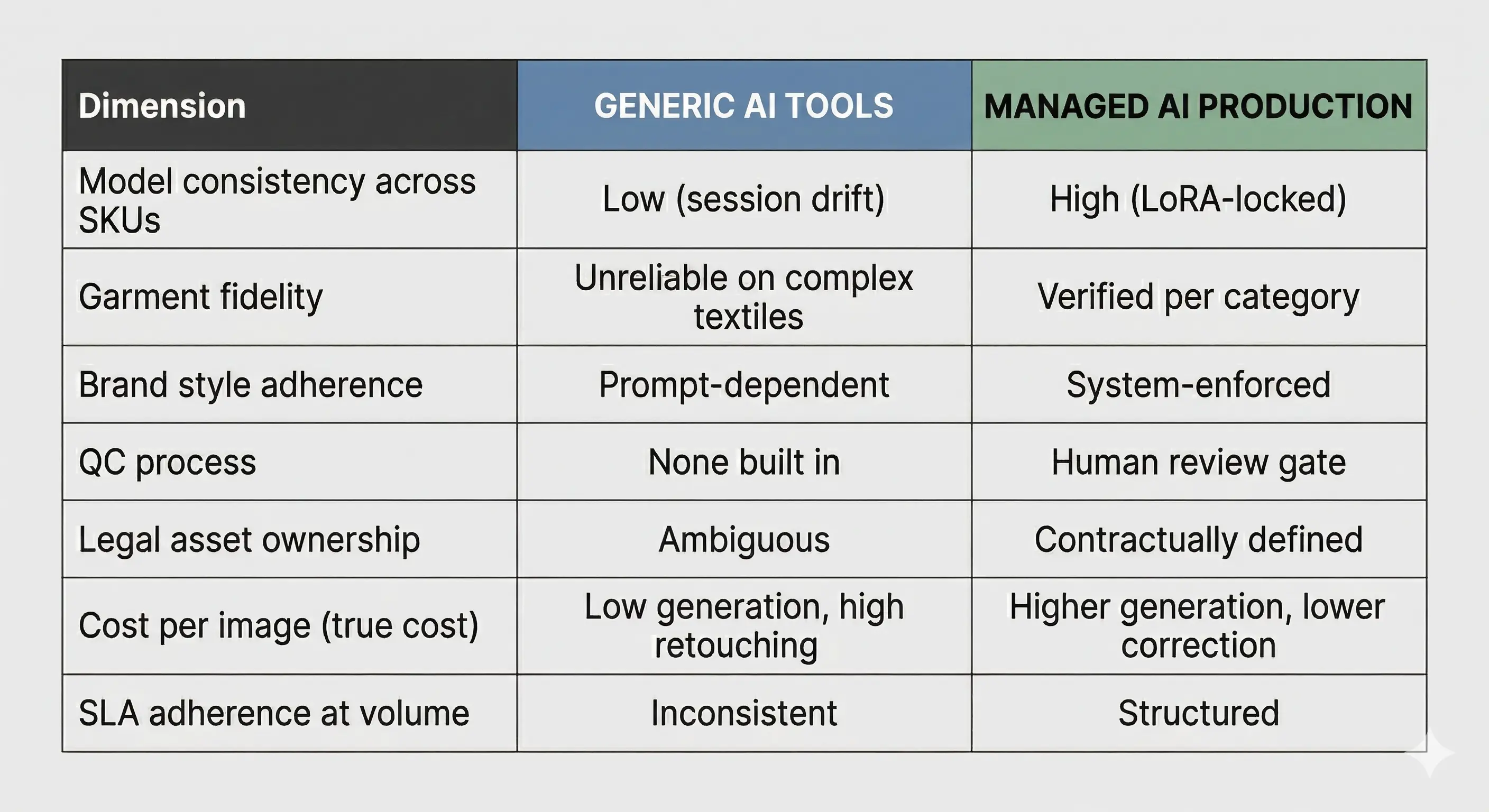
The table above represents the operational reality most brands discover six months into a self-managed AI workflow. The generation cost is not the production cost.
The Brand Lock Framework: Keeping AI Output On-Brand
Locking Models, Lighting, and Style Presets
A brand lock framework is not a single tool or setting. It is a production system that enforces visual consistency across every variable in the generation pipeline: the virtual model's physical characteristics, the lighting setup, the background color and texture, the color grading applied post-generation, and the crop and framing standards.
In practice, this means codifying your brand's visual language into parameters that the AI pipeline reads before any generation job runs. In Weavy (the node-based workflow platform recently acquired by Figma, combining Flux, Runway Gen-4, Stable Diffusion, and compositing tools), this can be implemented as a brand node that injects style parameters upstream of every generation call. Without this system, prompt-level brand guidance is too fragile to hold at volume.
How Brand-Specific LoRAs Enforce Visual Standards
A brand-specific LoRA (Low-Rank Adaptation) is a fine-tuned model layer trained on your approved production assets. It learns the specific visual characteristics you want to reproduce: a particular model's face and body structure, a lighting style, a fabric rendering approach. Once trained, it acts as a constraint on the base generative model, pulling outputs toward your established visual standard.
LoRA training requires a minimum of 30 to 50 high-quality reference images per target characteristic, and training stability varies by model architecture. Flux Pro LoRAs tend to generalize well across product categories; Stable Diffusion LoRAs can overfit quickly if the reference dataset is too narrow. The operational recommendation: train separate LoRAs for each major product category (tops, bottoms, outerwear, accessories) rather than a single catch-all.
Preventing Cross-Brand Contamination in Shared AI Pipelines
Shared AI pipelines, where the same generation infrastructure serves multiple brand clients, carry a specific and underappreciated risk: style leakage between brand LoRAs. If LoRAs are not properly isolated in the pipeline architecture, fine-tuning performed for one brand can influence outputs generated for another.
For agencies and production studios managing multiple fashion clients, this is both a brand safety and a legal issue. Exclusive model profile assignment (where a virtual model, once used for a brand, is contractually unavailable to any other client) is the clearest operational safeguard. Every managed AI production contract should include explicit exclusivity language for trained LoRAs and approved virtual model profiles.
A Brand-Safe AI Production Workflow for Ecommerce Teams
Step 1: Define Visual Brand Guidelines Before Any AI Prompt
Deliverable: a visual brand brief that translates your existing style guide into AI-readable parameters. This means documenting: approved skin tone range for virtual models, lighting temperature and direction, background specifications per product category, color grading reference (ideally a Capture One or Photoshop LUT file), and crop and aspect ratio standards per channel.
This brief does not need to be written in AI terminology. It needs to be specific enough that a prompt engineer can translate it into generation parameters without ambiguity. If your brief says 'natural lighting,' that is not specific enough. '4,200K daylight, soft box from camera left, minimal shadow on the right side of the garment' is.
Step 2: Use Human Art Direction to Brief the AI Pipeline
Deliverable: a validated prompt set and LoRA configuration reviewed by your creative director before any production batch runs.
AI-generated imagery still requires human creative input at the front end. The prompt is the brief. A generative model given a weak or generic prompt produces generic output. Your art director should be signing off on the generation parameters the same way they would sign off on a shot list before a studio shoot. This step is where most brands cut corners, and where most brand safety failures originate.
Step 3: Run Fidelity Checks on Fabric, Skin, and Lighting
Deliverable: a category-specific QC checklist applied to every generation batch before assets progress to retouching.
Fidelity checks should cover: garment silhouette accuracy against a reference flat lay, fabric texture consistency across colorways, skin tone accuracy against the approved virtual model profile, lighting direction consistency within and across a product batch, and absence of hallucinated details (extra buttons, invented seam lines, misrepresented fit). This is not a final QC step. It is a generation filter that prevents bad assets from consuming retouching hours.
Step 4: Apply QA Gates Before Any Asset Goes Live
Deliverable: a signed-off asset list cleared by both a retoucher and a brand stakeholder before DAM ingestion.
QA at this stage covers post-retouching brand compliance: color accuracy against approved swatches, background consistency, final crop and framing, and metadata tagging for file naming conventions. Any asset that does not pass the QA gate goes back to generation or retouching, not to the PDP page. This gate should be a formal checkpoint in the production SLA, not an informal review.
Step 5: Build a Feedback Loop Between AI Output and Brand Stakeholders
Deliverable: a monthly generation quality report shared with creative leadership, tracking pass rates, revision categories, and generation parameters that consistently underperform.
The feedback loop is what makes an AI production workflow improve over time rather than plateau. Track which prompt configurations generate the highest QA pass rates, which product categories require the most retouching correction, and which LoRA configurations are drifting and need retraining. Without this data, the workflow is a black box. With it, you can make systematic improvements that reduce per-image costs and increase SLA adherence over successive production cycles.
Common Brand Safety Mistakes in AI Visual Production
Skipping Human Review on High-Volume Batches
The mistake: treating high generation volume as a reason to reduce QC coverage, on the assumption that individual errors are statistically insignificant.
The consequence: a 1% error rate across 20,000 images is 200 published assets that are off-brand. At a fashion brand with a luxury positioning, even 10 incorrect images on live PDPs can trigger a brand perception issue, particularly if the error involves skin tone misrepresentation or garment fit distortion.
The fix: QC coverage should be proportional to volume, not inversely proportional to it. High-volume batches require sampling protocols (review a minimum of 10% of assets per batch) plus categorical review of any product type with a known high hallucination rate.
Using Generic Models Across Multiple Brand Clients
The mistake: sharing virtual model profiles between brand clients in a production studio environment, either to reduce LoRA training costs or because the pipeline was not architected with brand isolation in mind.
The consequence: visual style leakage between brands, potential IP liability, and the loss of the brand exclusivity that makes AI-generated imagery competitively defensible.
The fix: treat virtual model profiles as brand-specific assets with the same exclusivity logic applied to human models in traditional casting. Once a virtual model is trained and approved for a brand, it should be contractually and technically unavailable to any other client.
Treating AI Output as Final Without a QC Layer
The mistake: moving AI-generated images directly from generation to PDP upload without a retouching and QC step, on the basis that the output 'looks good enough.'
The consequence: AI skin can look plastic under studio lighting reference. Fabric edges may have clipping path artifacts. Background gradients may not match the brand's approved white specification. These errors are invisible at thumbnail size and visible at full PDP resolution, which is exactly where your customer is looking.
The fix: every AI-generated production asset should pass through at least one human retouching review before it is considered production-ready. This is not a bottleneck; it is the QA gate that protects the brand equity the AI workflow is supposed to support.
Ignoring Legal Exposure on AI-Generated Likenesses
The mistake: training LoRAs on images of real models without explicit contractual language covering AI use, or generating imagery of recognizable individuals without legal clearance.
The consequence: model rights litigation exposure, particularly as AI-specific image rights legislation becomes more specific in the EU and US. Several talent agencies have already begun adding AI use clauses to standard modeling contracts. Brands that did not update their existing contracts before beginning LoRA training may have existing exposure.
The fix: audit all training data provenance before any LoRA training begins. Ensure that every image used in a training dataset was either produced under a contract that explicitly permits AI use, or generated synthetically without reference to a real individual's likeness.
Tools and Guardrails That Support Brand-Safe AI Production
Content Moderation and Suitability Scoring
Content moderation in generative AI production is not just about filtering harmful output. For fashion brands, it means automated screening for outputs that violate brand standards: incorrect background specifications, skin tone deviation beyond an approved tolerance range, or garment fit errors that meet a defined severity threshold.
Integral Ad Science and similar tools were built for ad placement suitability. For in-house production QC, brands need custom scoring logic tied to their specific brand parameters. This can be implemented as a post-generation API layer that scores each asset against a brand compliance checklist before it enters the retouching queue. Assets below a minimum score threshold are automatically rejected to generation, bypassing human retouching entirely and reducing wasted QC hours.
Brand Governance Integrated Into DAM Workflows
A digital asset management system without brand governance rules is a storage system, not a production control system. Brand-safe AI production requires DAM integration that enforces metadata standards (file naming conventions, category tagging, season attribution), version control on approved assets, and access controls that prevent unapproved AI-generated images from reaching the PDP upload queue.
The Pixofix production pipeline integrates directly with client DAM systems at the QA gate stage, ensuring that only assets that have passed human retouching review and brand compliance scoring are eligible for ingestion. This prevents the most common AI production failure mode: an approved-looking but technically incorrect asset reaching the live catalog.
Proprietary Pipelines vs. Off-the-Shelf AI Tools
Off-the-shelf tools offer speed to first image. Proprietary pipelines offer consistency at volume. For brands producing fewer than 500 images per month, the investment in a proprietary pipeline may not be justified. For brands producing 5,000 or more images per month, the operational cost of managing brand safety inconsistencies in a generic tool workflow typically exceeds the cost of a managed production solution within six months.
The decision should not be based on per-image generation cost. It should be based on total production cost per final approved asset: generation cost plus retouching hours plus QC time plus revision cycles. That number tells the real story.
Metrics That Measure Brand Safety in AI Visual Output
Visual Consistency Score Across a Catalog
Definition: the percentage of AI-generated assets in a given production batch that pass a brand style checklist without requiring revision.
Target benchmark: 90% or above for a mature AI production workflow. Below 80% indicates a systemic generation parameter issue, likely a LoRA drift or a prompt configuration problem, that needs to be diagnosed before the next production batch runs. Track this score per product category, per virtual model configuration, and per generation model version. Aggregate scores hide the category-level failures that inflate retouching costs.
QA Pass Rate and Revision Turnaround Time
QA pass rate: the percentage of assets that clear the human retouching QA gate on the first review. A healthy rate for a well-configured AI workflow is 85% or above. A rate below 70% means the generation configuration is not fit for production and the pipeline needs recalibration before volume increases.
Revision turnaround time: the elapsed time between an asset being flagged at QA and a revised version being cleared. This metric directly impacts SLA adherence for catalog launch timelines. Target: under 24 hours for standard revisions, under 48 hours for generation-level corrections. Any revision requiring a new LoRA training run should be flagged as a production incident, not treated as a routine revision.
Brand Deviation Rate Per Production Batch
Brand deviation rate: the number of assets per batch that are rejected for brand compliance reasons (not technical quality reasons). This metric separates two distinct failure modes: technical generation failures (hallucinations, anatomy errors, clipping path artifacts) and brand alignment failures (wrong lighting, off-spec background, inconsistent virtual model).
Tracking these separately allows creative and technical teams to address root causes independently. A high technical failure rate indicates a generation model or prompt issue. A high brand deviation rate indicates that the brand brief is not being correctly translated into generation parameters, which is a process failure, not a model failure.
What Ecommerce Teams Should Demand From an AI Production Partner
Non-Negotiable Safeguards to Require
Before signing any AI production agreement, a creative director or ecommerce operations lead should confirm the following safeguards are in place:
• Exclusive virtual model assignment: the model profiles trained or configured for your brand should be contractually unavailable to any other client. Request explicit IP isolation language in the contract.
• Training data provenance documentation: any LoRA trained on behalf of your brand should come with documentation of the training dataset, what images were used, under what licensing terms, and whether any real individuals' likenesses are present.
• Human QC at every production gate: confirm that a qualified retoucher, not an automated scoring system alone, reviews every batch before delivery. Ask to see the QC checklist used.
• Defined revision SLA: a production partner without a contractual revision turnaround commitment is not a production partner. Expect a defined SLA of no more than 48 hours for standard revisions and a clear escalation path for generation-level failures.
• Brand deviation reporting: monthly reporting on QA pass rates, brand deviation rates, and revision categories. This data belongs to you and should be delivered without having to request it.
Questions to Ask Before Signing Any AI Production Contract
Ask the following directly, and evaluate the specificity of the answers:
• How are virtual model LoRAs isolated between your clients technically, not just contractually?
• What is your average QA pass rate for fashion catalog production, and can you provide category-level data?
• How do you handle a LoRA drift situation mid-production batch?
• What is included in your retouching QC step, and who performs it?
• Who owns the trained LoRA models after contract termination?
A partner who cannot answer these questions with specifics is running a generation service, not a managed production workflow.
Before and After: Brand Safety With and Without Managed AI
Unmanaged AI: What Can Go Wrong
A mid-size fashion brand running 3 seasonal drops per year piloted a self-managed AI workflow using Midjourney and a Stable Diffusion base model. Generation speed was excellent: 800 images per day at a fraction of traditional photoshoot cost. Quality at the thumbnail level looked acceptable.
At PDP resolution, the problems became visible three weeks into the pilot: virtual model face structure was drifting across the knitwear and woven categories, producing a different-looking model on adjacent product pages. Background white was inconsistent between product batches, with a warm cast on one set and a neutral cast on another. Several garments had hallucinated seam details that did not match the physical product, generating customer service contacts from buyers questioning product accuracy.
No QA gate was in place between generation and upload. By the time the creative team identified the problem, 1,200 affected assets were live. Manual correction required six weeks of retouching time and delayed the seasonal catalog launch by 11 days.
Managed AI Production: What Brand Safety Looks Like in Practice
The same brand, in the following season, moved to a managed production workflow. LoRAs were trained on approved model profiles before any production batch began, with stability verified across 200 test generations before production approval. A Weavy-based pipeline enforced brand parameters at the generation node level: lighting preset, background specification, and color grading LUT applied automatically to every output.
Every batch went through a three-stage review: automated brand compliance scoring, human retoucher QC, and brand stakeholder sign-off on a 10% sample before DAM ingestion. QA pass rate on the first season: 91%. Revision turnaround averaged 18 hours. The catalog launched on schedule. Total retouching cost per final approved asset was 40% lower than the unmanaged pilot, despite higher generation setup costs, because the correction rate dropped from 35% of assets to under 10%.



.png)

.png)
