

How to Scale Creative Production with AI
Why Creative Production Is Breaking at Scale
A mid-size fashion brand running four seasonal drops produces upwards of 8,000 product images per year. Add colorways, regional market variants, and social ad formats, and that number doubles. The majority of those assets are still moving through manual retouching queues.
The Volume Problem Ecommerce Brands Face Today
The numbers are straightforward: a brand with 2,000 active SKUs, each requiring three hero shots, two lifestyle images, and one video loop, needs 12,000 finished assets per season. Traditional studio pipelines, even efficient ones, produce roughly 300 to 500 final images per shoot day after retouching. The math does not work. Brands are either launching with underproduced catalogs, recycling stale assets, or paying for parallel studio bookings that bloat production budgets well past margin tolerance.
The problem is not ambition. It is infrastructure.
Why Traditional Studios Cannot Keep Up with Modern Launch Cycles
Fast-fashion brands like ASOS and Shein release new styles weekly. Even premium labels now run four to six drops per year alongside ongoing core replenishment. Each cycle demands fresh imagery, updated model presentations, and channel-specific formats for paid social, PDP, and wholesale portals. A studio booked six weeks in advance cannot respond to a trend that breaks on a Tuesday.
Reshoots are the worst-case scenario. When a hero image has an incorrect color representation, or a model's fit looks off against a specific background, the only traditional option is rebooking crew, a model, and a location. That process takes days and costs thousands per session.
The Hidden Cost of Inconsistent Visual Output
Inconsistency is not just an aesthetic problem. Research from Baymard Institute shows that product image quality directly affects return rates, with poor-quality or misleading product images cited by 22% of shoppers as a reason for returning online purchases. When lighting shifts between SKUs, when skin tones render differently across a catalog, when fabric textures appear flat on one image and textured on another, customers lose trust. That lost trust shows up in return rates, not just bounce rates.
Brand teams often underestimate how much production inconsistency costs them downstream. A retouching error that ships to live costs more in returns and re-shoots than it would have cost to QC it properly in the first place.
What Scaling Creative Production with AI Actually Means
Most discussions about AI in creative production conflate two very different things: AI as a tool that speeds up individual tasks, and AI as a production system that replaces entire workflow stages. Only the second interpretation matters at scale.
Beyond Automation: What AI-Assisted Production Really Looks Like
Automating a single step, background removal, for example, saves minutes per image. Automating an entire production pipeline, from garment input to finished PDP asset, saves days per campaign. The distinction is architectural. Brands that are seeing real results are not using AI tools in isolation. They are rebuilding their production pipelines so that AI handles the technical foundation and humans handle judgment, brand accuracy, and edge cases.
A practical example: a Stable Diffusion workflow trained on a brand's existing model and lighting references can generate 200 on-model product images overnight from flat-lay inputs. Without human review, roughly 15 to 25% of those outputs will have anatomy errors, incorrect fabric drape, or color drift. With a structured QC loop and human retouching pass, the yield rate climbs above 90%, and the effective cost per image drops significantly below traditional studio rates.
The Human-AI Partnership Model Explained
The model that actually works in high-volume fashion production is not AI replacing photographers and retouchers. It is AI handling the repeatable, technical generation work, and human specialists handling the craft decisions that cannot be systematized.
Art directors define the brand visual language. AI generates at scale within those parameters. Garment technicians review fabric behavior and fit accuracy. Retouchers correct anatomical errors, fine-tune skin rendering, and fix edge artifacts. Quality leads validate color accuracy against brand LUTs before any asset is approved. Every role still exists. The ratio of output per person changes dramatically.
Where AI Handles the Work and Where Humans Stay in Control
AI performs reliably on: background generation and replacement, color grading within pre-defined LUTs, exposure and white balance normalization, skin base cleanup, bulk format conversion, and asset versioning across channels.
Humans must stay in control of: casting and model brief approval, garment fit and drape review, fine texture detail correction (especially for knitwear, sheers, and embellishments), jewelry and accessory accuracy, and final brand QA sign-off. Raw AI hands are still anatomically wrong at a rate that would be commercially unacceptable without correction. AI skin rendering under controlled studio lighting can look plastic. These are not edge cases. They are predictable failure points that every serious production pipeline accounts for.
The Four Creative Stages AI Can Transform
Ideation and Creative Strategy
AI is most underused at the ideation stage and most over-discussed at the generation stage. Tools like Midjourney and Flux Pro are effective for rapid mood boarding. A Creative Director can generate 50 environmental references, lighting scenarios, and styling directions in an hour, something that previously required full production decks, stock image licensing, and rounds of alignment meetings.
AI-driven audience analysis tools can also inform creative strategy by surfacing which visual formats are driving engagement and conversion on specific channels, before a single asset goes into production. Deciding which looks to produce based on performance data from previous campaigns is a meaningful input that most brands are not yet using systematically.
Asset Production and Image Generation
This is where AI has the most immediate volume impact. Generative models, particularly Flux Pro and Runway Gen-4, are now capable of producing photorealistic on-model imagery from a flat-lay input with a trained brand model reference. The catch is consistency: without a locked reference system (a LoRA trained on your specific model, lighting, and color profile), each generation run will drift. Brand teams that treat generative AI like a one-click tool consistently get inconsistent results.
Kling and Imagen 3 are emerging as strong options for product video, specifically for short-loop PDP content where fabric motion and realistic drape behavior are required. Neither is production-ready for long-form campaign video without significant human supervision.
Post-Production, Retouching, and Quality Control
AI post-production tools have matured significantly for high-volume applications. Automated background segmentation, clipping path generation, and ghost mannequin processing can now handle 80% of a retouching pipeline without human intervention, provided the source photography is consistent. The remaining 20% (jewelry reflections, fine chain links, sheer fabrics, complex hair masking) still require expert retouchers. Generative AI for jewelry specifically is still unreliable. Metal reflections and fine chain links break almost every generative model currently available.
Capture One remains the professional standard for color grading in studio environments, particularly for managing consistent color science across large shoots. Where AI color tools are being integrated successfully, they are typically running batch LUT applications on top of a Capture One-graded master, not replacing the initial color session.
Distribution, Versioning, and Channel Adaptation
Once a master asset is approved, AI can handle the downstream adaptation work that previously consumed significant production time: resizing for platform specifications, copy-fitting text overlays, generating channel-specific crops, and producing variant colorways from a single approved master. This stage is often where brands leave the most time savings on the table, because it feels administrative rather than creative and does not get prioritized.
A workflow platform like Weavy, the node-based AI workflow tool combining Flux, Runway Gen-4, Stable Diffusion, and professional compositing, recently acquired by Figma, is designed specifically to connect generation, retouching, and distribution into a single automated pipeline. For teams producing across 10 or more channels simultaneously, this kind of connective architecture matters more than any single AI model.
A Step-by-Step AI Creative Production Playbook
Step 1: Lock Your Brand Before You Generate Anything
The single most common mistake in AI creative production is generating before establishing brand parameters. This is not a philosophical point. It is a practical one. Any generation run without a locked model reference, lighting profile, and color standard will produce assets that require more correction time than if they had been shot traditionally.
Deliverable at this step: A Brand Lock document containing approved model references (body type, skin tone, casting direction), lighting presets, color LUT files, pose and angle parameters, and a defined list of garment categories the system is trained for. This document is the input to every downstream workflow.
Step 2: Build Your Asset Pipeline from Existing Inputs
AI creative production does not require a new photo shoot to get started. The input is whatever your brand already has: flat-lays, ghost mannequin images, or existing on-model photography. These become the raw material for the generation pipeline.
Deliverable at this step: A categorized asset library with source images tagged by garment type, color, and fabric weight. These tags inform which generative model settings are applied per SKU. A knitwear top and a leather jacket require fundamentally different texture mapping parameters, and treating them identically produces visible quality gaps.
Step 3: Run AI Generation with Human Art Direction
Generation runs should never be unsupervised for brand-critical output. An Art Director or Senior Retoucher should be present for the first generation pass on any new garment category, reviewing outputs in real time and adjusting parameters before the full batch runs. A 30-minute review session at this stage prevents 10 hours of correction downstream.
Deliverable at this step: An approved generation parameter set for each garment category, with documented prompt structure, negative prompts, model weights, and resolution settings. This becomes a repeatable recipe for that category.
Step 4: Apply Quality Validation Before Any Asset Leaves Production
A two-layer QC system is non-negotiable for high-volume AI output. The first layer is technical: color accuracy against brand LUT, anatomical check for hands, feet, and shoulder structure, fabric texture fidelity, and background cleanliness. The second layer is brand QC: does this image represent the brand at the standard the brand team has approved?
Deliverable at this step: A batch QC report with pass, flag, and reject categories. Rejected assets go back for regeneration or manual correction. Flagged assets get a human retouching pass. Only passed assets advance to final delivery. This is the QC workflow Pixofix runs for high-volume clients, catching AI edge errors before they reach the brand team's review queue.
Step 5: Review, Approve, and Launch at Scale
The final approval stage should be the lightest step in the process, not the heaviest. If the Brand Lock, generation parameters, and QC layers are functioning correctly, brand team review should be a confirmation, not a discovery session. When teams report spending significant time in final review, it is almost always a sign that the QC layer upstream is not catching enough.
Deliverable at this step: Approved assets delivered in channel-specific formats, with file naming conventions matched to the brand's DAM or PIM system, ready for upload without additional processing.
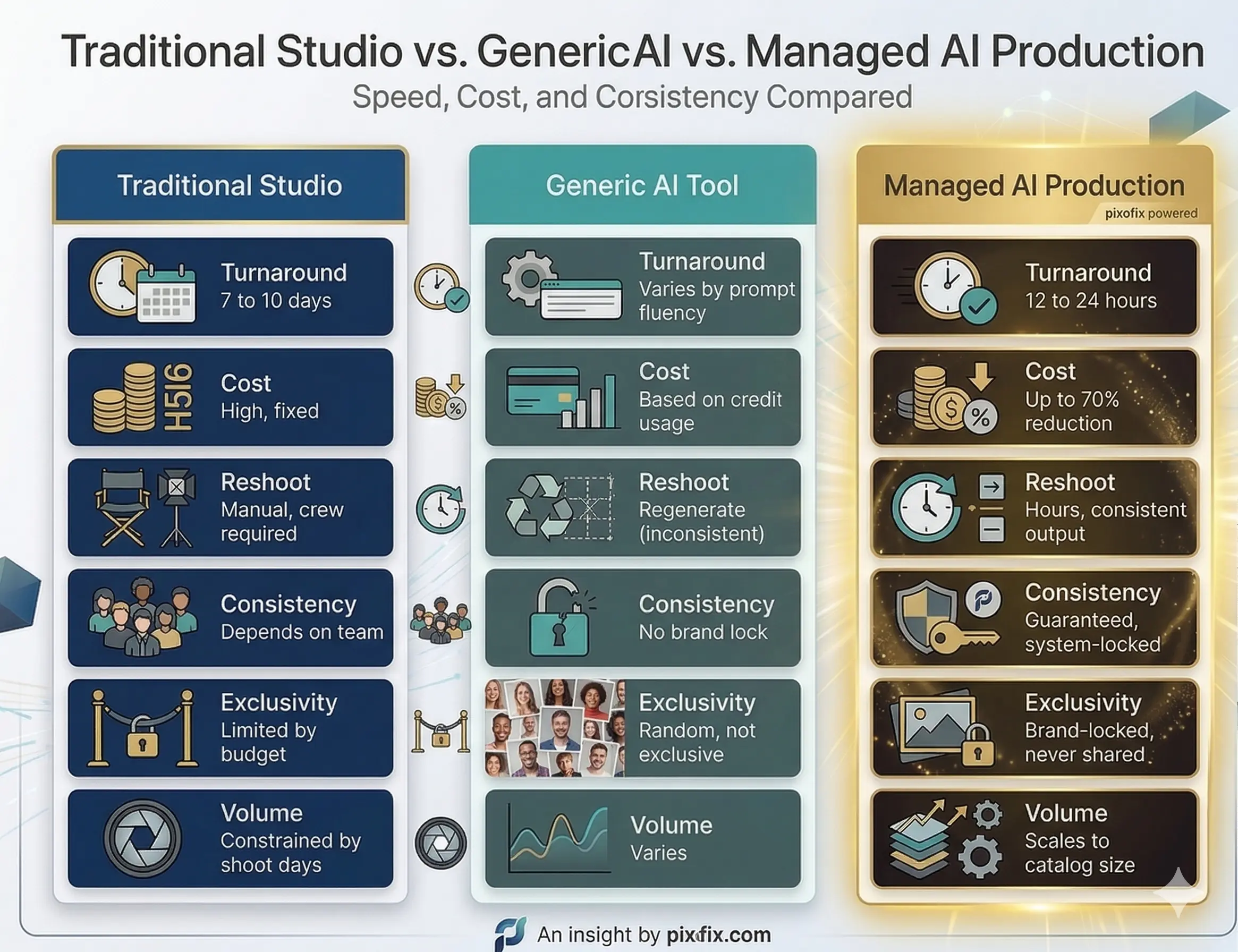
Traditional Studio vs. Generic AI vs. Managed AI Production
Speed, Cost, and Consistency Compared
Why Generic AI Tools Fail at Brand Consistency
Off-the-shelf generative tools are trained on broad datasets. They have no memory of your brand's model, lighting preference, or color standard from one session to the next. Every generation run starts from zero. A brand using Midjourney or stock-model AI tools for catalog production will produce images that look different from each other, because the system has no mechanism to enforce visual continuity.
The prompt engineering required to get consistent results from generic tools is itself a specialized skill. Brands that invest in prompt fluency for one tool then face re-training costs when that tool updates its model weights, which all major platforms do regularly. This is not a stable production infrastructure.
What a Managed AI Production Partner Delivers Differently
A managed production partner builds proprietary systems on top of generative models, training brand-specific LoRAs, locking model references, configuring lighting presets, and establishing QC protocols before the first asset is generated. The brand does not interact with the generative model directly. They interact with a production system designed around their specific visual standards.
This distinction matters most at enterprise scale. When a brand needs 500 new SKUs imaged for a drop launch in 72 hours, a generic tool with prompt-dependent outputs is not a viable option. A locked production system with defined quality SLAs is.
Brand Consistency at Scale: The Core Challenge Nobody Solves
What Brand Lock Means in Practice
Brand Lock is not a style guide. It is a technical specification that governs every parameter of the AI generation system: which model weights are used, what lighting values are applied, which pose angles are permitted, how fabric behavior is calibrated per garment category, and what color accuracy thresholds must be met before an image passes QC.
Most brands have style guides. Very few have translated those guides into generative system parameters. The gap between "we want warm, natural lighting" and a calibrated lighting preset that produces consistent results across 10,000 images is significant, and it is where most brand consistency failures originate.
Locking Models, Lighting, and Visual Language Across Every SKU
Virtual model consistency requires LoRA training on approved model references. A LoRA trained on 50 to 100 approved images of a specific model profile will produce consistent results across different garments and backgrounds. Without that training, model appearance drifts across the catalog, which customers notice even if they cannot articulate why the brand feels inconsistent.
Lighting consistency is governed by technical presets applied at the generation stage, not corrected at the retouching stage. Trying to normalize lighting in post is significantly more labor-intensive than generating with consistent lighting parameters from the start.
How ShootSync-Style Workflows Guarantee Output Consistency
A ShootSync-style workflow tracks every production parameter across a catalog: which model profile was used, which lighting preset was applied, which pose set was referenced, and which QC threshold the image met. This creates an auditable production record that makes consistency enforceable rather than aspirational.
When a brand scales from 200 SKUs to 2,000, that audit trail is what prevents visual drift. Without it, production decisions made informally accumulate over time until the catalog looks like it was shot by five different studios across three years, because effectively it was.
Quality Control Protocols That Actually Work
Why AI Output Always Needs a Validation Layer
There is no generative model currently available that produces brand-ready fashion imagery at 100% yield without human review. The failure modes are predictable: anatomical errors concentrated in hands, feet, and shoulder joints; fabric physics that do not match real garment weight; color drift between generation batches; and background artifacts at clothing edges. These are not rare exceptions. On unreviewed generation runs, they appear in 15 to 30% of outputs depending on garment complexity.
Ghost mannequin-to-model conversion via AI is still falling short for luxury editorial standards. Shoulder structure alone requires manual correction in approximately 60% of conversions, because the drape logic that fills in the invisible mannequin geometry is not yet reliable enough for luxury brand standards.
Building a Multi-Layer QA System for High-Volume Production
An effective QC system for AI-generated fashion imagery operates on three layers. The first is automated technical QC: software-based checks for resolution, color profile, file format, and basic anatomical flag detection. This catches obvious failures before they reach a human reviewer. The second is human technical QC: a retouching specialist reviewing flagged images for texture fidelity, edge accuracy, and color accuracy against brand LUT. The third is brand QC: a Creative Director or brand team representative confirming that approved assets represent the brand at the required standard.
Pixofix runs this three-layer system as a standard production protocol, with documented pass rates and SLA times per tier. For clients running 5,000-plus images per week, the automated first layer alone eliminates 40 to 60% of review burden before human QC begins.
Key Quality Metrics to Track: Realism Score, Color Accuracy, Consistency Rate
Teams scaling AI creative production should be tracking at minimum: first-pass approval rate (target above 85% for a mature pipeline), color delta against brand LUT (target Delta-E below 3), anatomical correction rate per garment category, average retouching hours per approved image, and SLA adherence by asset type. Without these metrics, production quality is assessed subjectively, and subjective assessment does not scale.
Cost per image is the most-watched metric but often the least useful in isolation. A low cost per image with a 40% first-pass approval rate is more expensive in total than a higher cost per image with a 90% approval rate, once human QC and correction time are factored in.
Scaling Specific Asset Types for Fashion and Ecommerce
AI PDPs: Product Images That Convert
On-model PDP images generated via AI now meet conversion-ready standards for most mid-market to premium ecommerce categories. The workflow is: flat-lay or ghost mannequin input, brand-locked model LoRA applied, lighting preset matched to PDP standard, background generated to brand specification, and human QC pass for anatomy and fabric accuracy. Turnaround at volume is 12 to 24 hours per SKU batch.
Categories where AI PDPs currently perform best: wovens, denim, jersey knits, and structured outerwear. Categories requiring more human intervention: embellished garments, fine knitwear, sheer fabrics, and anything with complex drape behavior at the hem or sleeve. Setting category-specific quality thresholds is more effective than applying a single standard across an entire catalog.
Lifestyle and Campaign Imagery Without the Shoot
AI lifestyle imagery has advanced faster than most brand teams realize. Environment generation using models like Flux Pro can now produce photorealistic on-location looks, from urban street settings to controlled studio environments, with consistent model presentation and accurate fabric behavior. The creative brief is the same as a traditional shoot brief: environment type, lighting mood, model direction, and garment focus.
What AI cannot yet replicate reliably is the genuine expressiveness of a real human subject in motion. For brand campaigns where model performance and authentic emotion are central to the creative, AI lifestyle still requires significant retouching and compositing to meet the brief. For catalog lifestyle and social content at volume, it is commercially viable today.
Product Video at Scale for PDP, Social, and Ads
Generative video for fashion is the most technically demanding and the most rapidly improving category. Runway Gen-4 and Kling are both capable of producing short-loop PDP videos with convincing fabric motion for standard garment types. The production workflow requires a strong still-image reference as the starting frame, a defined motion brief (fabric movement direction, camera path, model gesture), and a QC pass focused specifically on physics consistency across the clip duration.
For TikTok and Reels-format content, AI video can now match brand-safe execution standards for most soft goods categories. For luxury campaign video where the emotional register and cinematographic quality must meet editorial standards, AI video is a useful pre-visualization tool, not yet a finished output.
High-Volume Retouching with AI-Enhanced Workflows
For brands running existing photography through a retouching pipeline, AI tools integrated into Photoshop workflows can automate exposure normalization, background segmentation, skin base cleanup, and fabric wrinkle reduction. These tasks typically account for 60 to 80% of retouching time on standard ecommerce images. Automating them allows a team of retouchers to handle significantly higher volume without additional headcount.
The complexity and cost of this automation scales with consistency of source photography. A studio shooting to a defined technical spec (fixed camera height, controlled lighting, consistent garment steaming) will see automation rates of 80% or higher. A brand with variable source photography from multiple studios will see significantly lower automation rates, because the AI tools are calibrated to consistent inputs.
Common Mistakes When Scaling Creative Production with AI
Generating Before Establishing Brand Guidelines
The mistake: Brands start generating images immediately to see what AI can produce, without first translating brand guidelines into generative system parameters.
The consequence: Output looks impressive in isolation but inconsistent as a catalog. Each generation run drifts from previous ones. Brand teams spend more time in review flagging inconsistencies than they would have spent on traditional production.
The fix: Spend the first two weeks of any AI production implementation on parameter definition, not generation. Train the LoRA, calibrate the lighting presets, define the QC thresholds. Generate only after those parameters are locked and approved by the Creative Director.
Skipping Human Oversight and Shipping Raw AI Output
The mistake: Teams treating generation approval rate as a proxy for quality, assuming that images that look acceptable on a monitor at 50% zoom are ready to ship.
The consequence: Anatomical errors, color drift, and texture artifacts appear on product pages at full resolution, where customers and brand directors both notice them. Return rates increase. Brand team trust in the AI workflow collapses.
The fix: Every AI-generated asset for customer-facing use must pass a human retouching review at 100% zoom minimum. Automated QC tools can flag obvious failures, but the judgment call on whether an image meets brand standard requires a trained human eye.
Using One-Size-Fits-All Tools for Catalog-Wide Production
The mistake: Applying the same generative model settings and prompts across every garment category in the catalog.
The consequence: Results are strong for the garment types the model handles well (typically jersey and woven fabrics) and poor for the categories it handles badly (knitwear, sheers, structured tailoring). The brand team sees inconsistent quality and loses confidence in the system overall.
The fix: Define category-specific generation parameters and QC thresholds. A knitwear category specification is different from a denim specification in terms of texture mapping settings, drape parameters, and acceptable anatomy tolerances. Treating them the same produces predictably variable results.
Ignoring Fabric, Fit, and Anatomical Accuracy in Fashion Assets
The mistake: Prioritizing visual appeal over technical product accuracy in generated images.
The consequence: AI-generated images show garments in ways that do not accurately represent how they fit or drape on a real body. Customers receive products that look different from the images. Return rates for fit-related reasons increase. In regulated markets, misleading product representation is a legal risk.
The fix: Every garment category should have a defined set of fit accuracy checkpoints reviewed by someone with garment technical knowledge, not just visual design experience. Fabric weight, drape point, and silhouette accuracy are not aesthetic preferences. They are product accuracy standards.
ROI and Performance Metrics Worth Measuring
Time Saved per SKU vs. Traditional Production
The baseline metric for any AI production ROI case is time from asset request to approved, live image. For a traditional studio workflow, this is typically 7 to 14 days including shoot scheduling, production, and retouching. For a managed AI production workflow with a locked Brand Engine, the target is 12 to 48 hours.
Track this metric by asset type and by urgency tier (planned versus reactive production). The gap between planned and reactive production timelines reveals how much the brand is paying in rush costs and delayed launches, and where AI production delivers the highest immediate value.
Cost Reduction Benchmarks Across Asset Types
Published benchmarks vary significantly by brand size and production complexity, but a realistic comparison for mid-to-large ecommerce brands:
- Traditional on-model PDP: $35 to $150 per finished image (including shoot, model, retouching)
- Generic AI tool output with internal prompt management: $5 to $20 per image (excluding QC labor)
- Managed AI production with brand lock and human QC: $8 to $30 per image at volume
The managed AI range narrows as volume increases. At 5,000-plus images per month, per-image costs at the managed AI tier typically fall below $15 with turnaround under 24 hours. That is not achievable with traditional production at any budget.
Conversion Impact of High-Fidelity Product Imagery
Most brands do not run controlled experiments on image quality versus conversion rate because it requires holding back a catalog segment with lower-quality images, which no merchandising team will approve. The proxy metric most used is return rate by image type, which is measurable without a controlled experiment.
A 1% reduction in return rate on a $50M annual ecommerce business represents $500,000 in recovered revenue. When AI-generated imagery meets or exceeds the realism threshold of traditional photography, return rates hold flat or improve. When it falls below that threshold, return rates increase. Realism score is not a vanity metric.
How to Build Your AI Production ROI Case Internally
The internal ROI case for AI creative production typically needs to address three objections: quality risk, brand risk, and headcount impact. The quality and brand risk objections are answered with a pilot production run covering 50 to 100 SKUs across multiple garment categories, with a defined QC protocol and a brand team review at the end. The headcount impact question is best addressed by framing AI production as volume capacity expansion rather than team reduction: the same team produces more, not fewer people produce the same.
Document the pilot with before-and-after metrics: time from brief to approved image, cost per approved image, first-pass approval rate, and brand team satisfaction score. These four numbers, presented alongside quality samples, are almost always sufficient to move a production investment decision forward.
Advanced Strategies for High-Volume Creative Scaling
Seasonal Campaign Automation from a Single Garment Brief
The most efficient brands running AI creative production are not generating assets one SKU at a time. They are ingesting a full seasonal range as a batch input, applying the Brand Engine across the entire collection simultaneously, and generating hero PDP, lifestyle, and video assets in a single production run. The garment brief (SKU reference, colorway, fabric type, silhouette) is the only variable input. Everything else is systematized.
Most brands underestimate how long it takes to prepare a seasonal garment brief in the format that AI production systems can use. Structured data input (not a PDF brief) with tagged garment attributes, color references against a Pantone or brand swatch library, and categorized fabric metadata takes two to three weeks to prepare for a new collection, even with an experienced team. That preparation time is where seasonal campaign automation either works or stalls.
Multi-Format and Multi-Channel Asset Delivery
A single approved master image should produce a minimum of eight to twelve channel-specific variants without additional production time: PDP hero (multiple aspect ratios), zoom crop for mobile, lifestyle crop for editorial, paid social formats (1:1, 4:5, 9:16), wholesale portal format, and regional market variants where color or model presentation differs by market.
This downstream versioning is typically handled manually in most brand production workflows, consuming 20 to 30% of total production time for tasks that are entirely systematizable. File naming conventions, metadata embedding, and format specifications should be defined once and applied automatically. Teams that are still manually renaming and resizing approved assets have not yet automated the part of production that is easiest to automate.
Training Brand-Specific AI Models for Enterprise Consistency
For enterprise brands producing at catalog scale, the most significant quality and consistency investment is in brand-specific model training. A LoRA trained on 100 to 500 approved brand images, covering multiple garment categories, lighting conditions, and model presentations, produces materially different output than a generic model prompted toward brand guidelines.
The training process takes two to four weeks for the initial model and requires ongoing refinement as new garment categories are added or brand direction evolves. The output is a proprietary model that no other brand uses, which is the only way to guarantee that AI-generated imagery is genuinely brand-exclusive rather than brand-adjacent. The cost of that training is recovered within the first three to four production campaigns for any brand generating more than 500 images per season.
FAQs
Can AI fully replace a traditional photo studio for ecommerce brands?
Not yet, and not uniformly across all categories. AI on-model production is commercially viable today for most soft goods categories at mid-market to premium price points, with a human QC and retouching layer. It is not yet viable as a standalone replacement for luxury editorial campaigns, complex embellished garments, or footwear and accessories requiring precise structural accuracy. The correct frame is selective replacement by category and asset type, not wholesale studio elimination.
How do you maintain brand consistency when generating thousands of AI images?
Consistency at scale requires a trained brand-specific LoRA, locked lighting and color presets, defined pose and angle parameters per garment category, and a documented QC protocol with measurable thresholds. Consistency is not achieved through prompt engineering alone. Any production system that relies on a human writing precise prompts for each generation run will drift over time, because prompts are not reproducible across model updates and personnel changes. System-level parameters are reproducible. Prompts are not.
What inputs do you need to start an AI creative production workflow?
The minimum viable input set is: existing product photography (flat-lays, ghost mannequin images, or on-model references), an approved model brief (body type, skin tone, casting direction), a lighting reference (three to five images showing the approved lighting standard), and a color reference file (LUT or approved color palette). You do not need new photography to start. Most brands already have sufficient source material to train an initial Brand Engine from their existing asset library.
How long does it take to scale from pilot to full catalog production with AI?
A realistic timeline for a brand starting from zero: two weeks for Brand Lock definition and parameter setup, one to two weeks for initial LoRA training and generation testing, two weeks for pilot production covering 50 to 100 SKUs with full QC and brand review, and two to four weeks for parameter refinement based on pilot feedback. Full catalog production typically begins at week eight to ten. Brands that try to compress this timeline by skipping the pilot phase consistently report higher correction costs and longer brand team review cycles in the scale-up phase.
Is AI-generated imagery good enough for high-end fashion brands?
For specific asset types and categories, yes. AI PDP imagery for ready-to-wear, denim, and outerwear is now meeting the realism and brand accuracy standards of multiple luxury and contemporary brands in active production. The qualifier is "managed AI production with human QC," not "generic AI tool with prompt engineering." Unmanaged AI output is not appropriate for luxury brand standards. A structured production system with brand-locked parameters, human art direction, and multi-layer quality validation produces imagery that luxury brand Creative Directors are approving for live use today.

%20(5).jpg)
.png)

.png)
